
Browser Security Against ClickFix Attacks.
Neutralize Fake CAPTCHAs & Clipboard Payloads.
ClickFix bypasses traditional network proxies and endpoint detection by tricking employees into executing PowerShell commands copied directly from malicious browser tabs. EyeBall provides real-time in-DOM defense inside Chrome, Edge, and Brave, suppressing deceptive overlays and revoking clipboard write access before a single terminal keystroke occurs.
See EyeBall Intercept a Live ClickFix Exploit
Watch how our browser-native security engine identifies the fraudulent CAPTCHA overlay and immediately blocks the clipboard injection before the victim can open the Windows Run dialog.
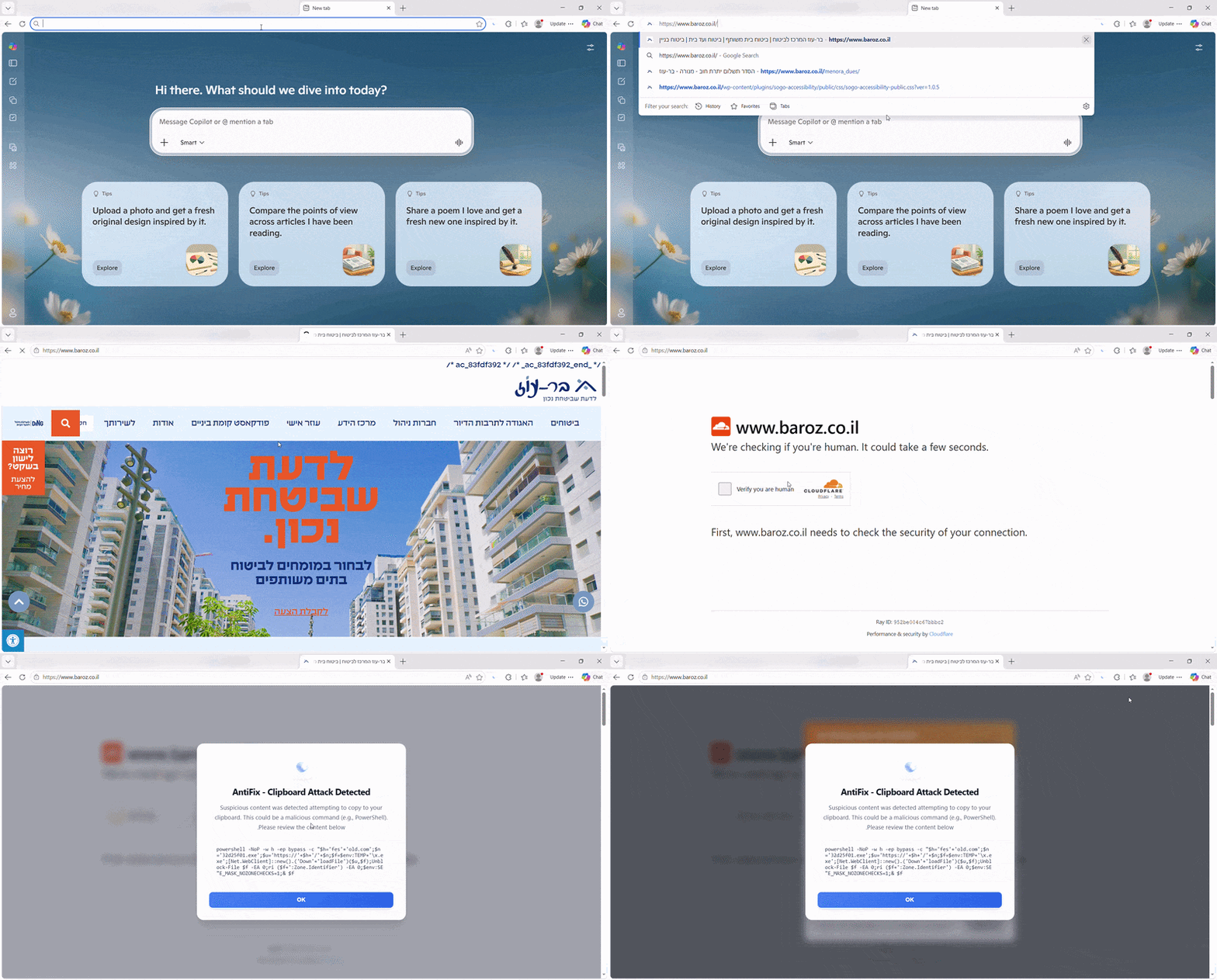
navigator.clipboard.writeText
Verdict: Blocked at Client Memory Boundary (0ms Detour)
Why ClickFix Has Become the #1 Evasion Tactic
Threat actors behind Lumma Stealer, Vidar, and RedLine have abandoned email attachments. Here is how they weaponize your users’ muscle memory against you:
Compromised Site or Ad
The victim lands on a compromised legitimate website, an open redirect, or a poisoned ad network with normal reputation.
Fake CAPTCHA Modal
A high-fidelity overlay mimicking Google reCAPTCHA or Cloudflare Turnstile appears, claiming verification is required to proceed.
Clipboard Injection
JavaScript silently populates the clipboard with an encoded PowerShell command (e.g. powershell -w h -ep bypass...).
Win + R Social Hack
The dialog instructs the user to press Win+R, paste, and hit Enter to "complete verification".
Infostealer Dropped
PowerShell downloads the payload in memory, strips Mark-of-the-Web (MOTW), and harvests browser session tokens and passwords.
Why Legacy SWG, EDR, and Training Fail to Stop ClickFix
Secure Web Gateways (SWG)
SWGs (like Zscaler or Netskope) inspect traffic traveling over HTTP/S proxies looking for malicious executable signatures.
Endpoint Detection (EDR)
EDR monitors endpoint process hierarchies for anomalies, such as explorer.exe spawning powershell.exe.
User Awareness Training
Annual training warns against suspicious email attachments, phishing links, and unauthorized USB drives.
How EyeBall Disarms ClickFix at the Root
By running natively at the DOM layer inside standard browsers, EyeBall disrupts the attack sequence at Step 2 and Step 3, before the victim even reaches for the keyboard.
Fraudulent DOM Overlay Suppression
EyeBall checks DOM structures in real time. When an unauthorized script attempts to render an unverified overlay spoofing Cloudflare Turnstile or Google reCAPTCHA, EyeBall neutralizes the overlay and flags the page.
Clipboard API Execution Revocation
EyeBall intercepts navigator.clipboard.writeText invocations. If the string contains script keywords (powershell, cmd.exe, mshta, base64 encoded payload indicators), the write is instantly revoked.
Immediate Visual Employee Warning
Before the user can follow instructions to press Win+R, EyeBall displays a high-contrast alert banner explaining that the page attempted a social engineering exploit.
event_type: "DOM_OVERLAY_SPOOFING_DETECTED"
target_vector: "ClickFix / Fake Cloudflare Turnstile"
intercepted_call: "navigator.clipboard.writeText"
payload_sample: "powershell -NoP -w h -ep bypass -c [Net.WebClient]..."
clipboard_action: "REVOKED_AND_SCRUBBED"
execution_latency: "0.04ms"
user_impact: "Exploit Neutralized, Session Safe"
Built for Every Organization. Engineered for Zero Friction.
Whether protecting a fast-growing team of 25 or an enterprise fleet of 25,000, EyeBall delivers Fortune-500 grade ClickFix defense without infrastructure complexity or user resistance.
5-Minute Rollout
Deploy silently across your entire fleet in under 5 minutes using Microsoft Intune, Active Directory GPO, Google Workspace Admin, Jamf, or your existing RMM (NinjaRMM, Datto).
Zero Helpdesk Tickets
Engineered with 100% web application compatibility. Normal employee workflows, authenticated SaaS platforms, and standard copy-paste operate cleanly with zero false positives.
Native Browsers Loved by Users
No need to force employees to migrate to a clunky proprietary browser. EyeBall runs natively and silently inside the browsers your users already know: Chrome, Edge, and Brave.
Zero Proxy Latency & Privacy
100% on-device in-DOM inspection. No proxy certificate installation, no breaking TLS/SSL sessions, zero privacy liability (GDPR/HIPAA), and absolute 0ms network latency.
ClickFix & Browser Security FAQ
Everything security leaders and IT administrators need to know about stopping ClickFix exploits.
What is a ClickFix attack and how does it work?
ClickFix (also known as ClickHijacking or fake CAPTCHA social engineering) is a modern browser-based attack vector. Attackers compromise legitimate websites to display fake human verification prompts (spoofing Cloudflare Turnstile or Google reCAPTCHA) or missing plugin errors. The page silently injects an obfuscated malicious script into the user's clipboard and instructs them to press Win + R, paste, and hit Enter. Because the user manually executes native Windows tools, traditional proxy download filters see no file in transit.
How does browser security protect against ClickFix attacks?
Modern browser security solutions like EyeBall operate directly inside the browser DOM where ClickFix occurs. EyeBall analyzes on-screen DOM elements in real time to detect fraudulent CAPTCHA overlays and intercepts unauthorized navigator.clipboard.writeText calls containing terminal execution syntax (such as powershell, mshta, or cmd). By blocking the clipboard injection and alerting the user, EyeBall halts the attack before any code can run.
Why do traditional Secure Web Gateways (SWG) and EDR miss ClickFix?
Legacy SWGs and network proxies look for file downloads (like .exe or .zip) traveling across HTTP/S connections. Because ClickFix transfers no malicious file over the network, proxies are completely blind to it. EDR and antivirus tools only see legitimate Windows binaries (PowerShell or cmd.exe) executed by the logged-in user; by the time behavioral EDR triggers on encoded commands, credentials and session tokens have already been exfiltrated.
How does client-side in-DOM security differ from network proxies and EDR?
EyeBall delivers pure client-side in-DOM inspection with 0ms network latency and zero SSL decryption proxies. While network proxies only inspect packets in transit (missing zero-file ClickFix exploits) and EDR monitors process trees after execution begins, EyeBall intercepts attacks at the exact point of user interaction inside the browser before the operating system is touched, deploying in 5 minutes via Microsoft Intune or GPO.
Does EyeBall interfere with legitimate employee copy-pasting?
No. EyeBall specifically targets programmatic, deceptive clipboard write attempts executed by untrusted JavaScript contexts and DOM overlays mimicking verification dialogs. Standard user-initiated keyboard shortcuts (Ctrl+C, Ctrl+V) and verified enterprise applications operate normally with zero friction.
Ready to Neutralize ClickFix Across Your Fleet?
Book a 15-minute live threat simulation and see how EyeBall stops ClickFix, AiTM phishing, and GenAI leaks natively in Chrome & Edge with zero proxy latency.